
Bangladesh Railway Ticket Booking
Book your train tickets online with ease
 1
1Search Trains
Enter route and date to see live options.
 2
2Select Train
Compare time, class and seats.
 3
3Pay
Confirm payment, get instant ticket.
Standing in a station queue for hours, only to find your preferred seat is gone by the time you reach the counter — most Bangladeshi train travelers have been through this at least once. The good news is you don't have to anymore. With a phone or computer, you can now book a Bangladesh Railway ticket online in a few minutes, from wherever you are. This guide walks through exactly how to book, what tickets cost, which seat class fits your trip, how to track your train's live location, and what to watch out for so your booking goes smoothly.
Ways to Book a Bangladesh Railway Ticket
There are three ways to get a Bangladesh Railway ticket:
- Online E-Ticketing System — the official portal at eticket.railway.gov.bd, or a helper site like RailwayTicketsBD.com that routes you straight into the official system.
- Rail Sheba mobile app — available for both Android and iOS.
- At a station counter — useful if you'd rather pay cash or don't have online payment access.
How to Book a Bangladesh Railway Ticket Online
All three pull from the same booking system, so there's no wrong choice here — pick whichever is most convenient for you. All three methods are explained in detail below.
Follow these steps and you can finish a booking in a few minutes without ever visiting a station.
Through the Online E-Ticketing System
Follow the steps below to buy Bangladesh Railway tickets through the official online e-ticketing system.
Step 1 — Open the ticket portal
Use the search form on RailwayTicketsBD.com, or go directly to eticket.railway.gov.bd. If you have the Rail Sheba app installed, you can do the same from there. RailwayTicketsBD.com's search form will take you straight into the official booking system — the actual purchase happens there.
Step 2 — Enter your journey details
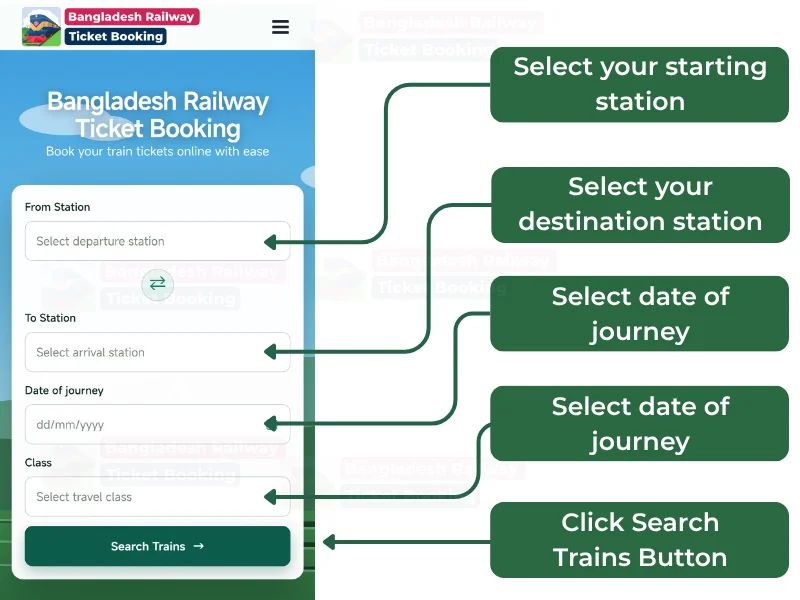
Select your departure station under "From Station" from the drop-down menu and your destination under "To Station." Pick your travel date from the calendar, choose your seat class (Shovan, Shovan Chair, Snigdha, AC Seat, AC Berth, etc.), and click Search Trains.
Step 3 — Log in or register
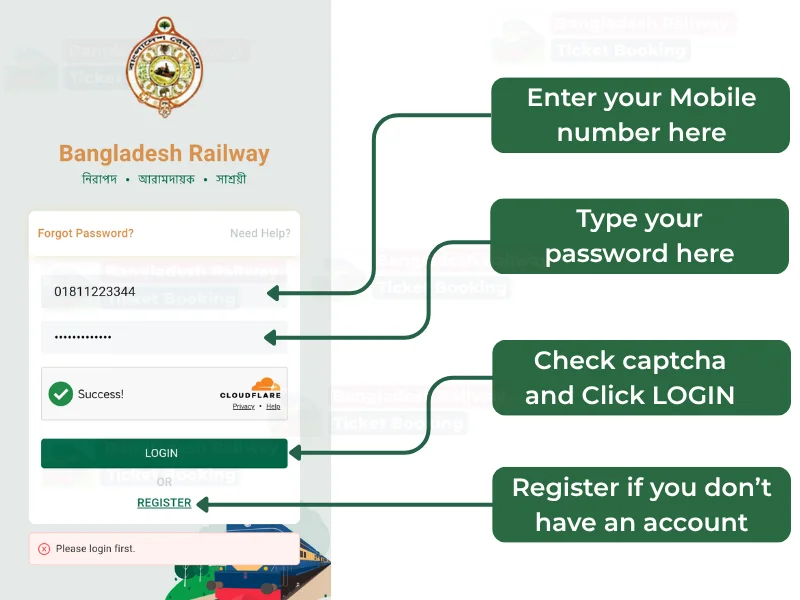
If you already have an account, log in with your mobile number/email and password. First-time users can complete railway ticket registration online quickly with their name, mobile number, email, and NID/passport number.
Step 4 — Choose your train and seat
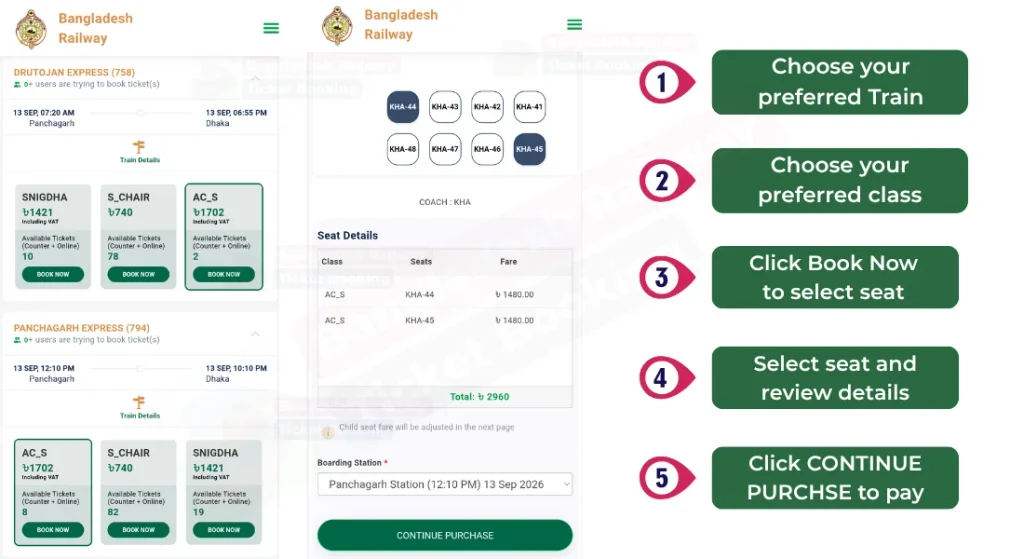
Your search results will show every train running that day, departure times, available seats per class, and fares. Click Book Now on the train you want, pick an open seat from the seat map, and continue to purchase.
Step 5 — Verify with OTP
An OTP will be sent to your registered mobile number. Enter it to verify, then mark each passenger as Adult or Child before proceeding.
Step 6 — Complete payment
You can pay through mobile banking — bKash, Nagad, Rocket, Upay, TapTap — or by card, including Visa, Mastercard, Amex, or DBBL Nexus. Once payment goes through, your booking is confirmed and your e-ticket is instantly downloadable as a PDF, with a copy also sent by email or SMS. Before you pay, double-check the passenger name, route, date, train, class, and seat — fares and seat availability can shift quickly around weekends, holidays, and especially Eid.
Booking Through the Rail Sheba App
If you'd rather book from your phone, the official Rail Sheba app works well — especially during high-traffic periods like Eid when the website can get overloaded.
- Search "Rail Sheba" on the Play Store or App Store and download the app.
- Log in if you already have an account, or tap Register to create one.
- Enter your From and To stations, pick a Class and Journey Date, then tap Search Trains.
- Select your train and seat, tap Book Now, verify with the OTP, and complete payment.
Nearly everything you can do on the website — booking, viewing past reservations, downloading e-tickets, even live train tracking — is also available in the app.
Buying at a Station Counter
If you don't have online payment access, or just prefer buying in person, you can still go to your nearest station counter. You'll need to bring your ID (NID, passport, or birth certificate) there too. Intercity tickets are best booked in advance, while local and commuter train tickets are usually sold a few hours before departure. Some standing tickets are also only sold offline at the counter.
Bangladesh Railway Ticket Price
Fare mainly depends on two things: distance and seat class. Even on a short route, an AC class ticket will always cost more than a non-AC one. As a rough guide:
- Economy / Shovan class: starts around BDT 40, rising with distance.
- Snigdha / AC Chair: typically starts around BDT 500.
- AC Berth (cabin): can go up to around BDT 2,500 depending on distance.
These are just ballpark figures — for the exact, current fare, search your station, date and class in the form above and the final price will show at checkout. At the station, the price list is usually posted right beside the ticket counter.
Who Gets a Discount
Discounts and free travel aren't available to everyone, but a few groups do qualify:
- Children traveling on a standing ticket usually don't need a separate ticket of their own.
- Railway staff can travel free of charge under specific internal rules.
- Freedom fighters and certain government officials are entitled to fare concessions.
Exact discount rates and eligibility can change over time, so it's worth confirming the current policy on the official portal or at the station before you travel.
Booking Rules and Policies You Should Know
A few rules are worth knowing before you start booking, so nothing catches you off guard later.
How far in advance you can book
Under normal conditions, tickets go on sale 10 days before the journey date. During Eid and other major holidays, the railway authority usually runs a separate advance-sale schedule — typically opening 5 days ahead of each travel date, released in stages by region, and sold strictly online. Since this holiday schedule is announced fresh each time and can change, always check the current dates on the official portal before planning around it.
What registration requires
To create an account, you'll need your name, mobile number, email address, date of birth, and a valid NID, passport, or birth certificate number. Without this, your account can't be verified.
What to carry while traveling
Whoever the ticket is booked under must carry that same NID or ID document. This matters especially for e-tickets — staff may check the ticket name against your ID before or during the journey.
Cancellation and refunds
Cancelling at least 24 hours before departure usually gets you a partial refund. That said, the refund percentage and conditions depend on how close to departure you cancel and the ticket type, and these can change — so the most reliable way to check is to log into your account and look at the cancellation option on your actual booking.
Group bookings
You can book tickets for multiple passengers in one transaction, but there's a cap on how many tickets one account or transaction can hold, especially around Eid. This limit is shown before you start booking.
Traveling without a valid ticket
If you're caught without a ticket, or traveling under someone else's ticket, you'll typically be fined around double the normal fare. Keep the passenger name on the ticket accurate to avoid this.
Seat Class Guide — Which One Fits You
Not every class is available on every train, but here's what each one actually means:
- Shulov: The cheapest fare class, mostly found on local trains. No assigned seat number, no AC — you sit wherever there's space.
- Shovan: A budget intercity option, but with an assigned seat number. Seats are foam or rexine-covered, bench-style.
- Shovan Chair: The most popular choice for everyday travelers — individual, bus-style seats instead of a bench. A solid pick for long-distance comfort on a modest budget.
- First Class Seat: A non-AC chair coach with bigger, softer seats than Shovan Chair. Good if you don't need AC but want a quieter ride.
- First Class Berth: A non-AC cabin/sleeper seat, ideal for overnight journeys — sits like a normal seat by day, converts to a bed at night.
- Snigdha: The AC chair coach — cool, dust-free, and the go-to choice for a comfortable daytime trip.
- AC Seat: A seat inside an AC cabin, typically used for daytime trips. Good if you want the privacy and quiet of a cabin without needing to sleep.
- AC Berth: The most premium AC cabin, with proper bedding and a door you can lock from inside — maximum comfort and security for a long overnight trip.
How to Track Your Train's Live Location
Besides booking, many travelers also want to know exactly where their train is before heading to the station. Bangladesh Railway offers a couple of simple ways to check a train's live running status without needing a ticket first:
- Rail Sheba app: Open the app and use its train tracking or "running status" option to see a train's current live location in real time.
- SMS-based tracking: Bangladesh Railway also runs an SMS service for live train location updates. The exact number and message format are published on the official railway website and can change from time to time, so it's best to confirm there before relying on it.
- Third-party tracking pages: A few independent sites mirror this same location data, though the official app tends to be more reliable — especially during heavy-traffic periods like Eid.
This is especially handy if you're already at the station or want to know how late a train is running, so you can time your pickup, connection, or trip to the station accordingly.
Lost Your Ticket, or Need to Change It?
Lost ticket: For an e-ticket, just log back into your account and re-download it from your booking or purchase history. If you lose a paper ticket bought at a counter, contact the nearest station authority as soon as possible.
Changing your date or seat: In most cases, yes, you can — but it's usually handled at the station counter for a small fee, and only if a seat is available. Self-service changes online are still limited, so check what's available in your account first.
Stay Safe While Booking
Since payment is involved, a few precautions matter. Never enter your password, NID number, card details, mobile banking PIN, or OTP on any third-party site. Before paying, check your browser's address bar to confirm you're on the current official e-ticketing domain — the government has changed the official domain before. Helper sites like RailwayTicketsBD.com don't collect payments, passwords, or personal information themselves; they only help you find your route and hand you off to the official system.
Frequently Asked Questions
Final Thoughts
Booking a Bangladesh Railway ticket online is now faster and far less stressful than standing in a station queue. Whether you use the official e-ticket portal, the Rail Sheba app, or SMS-based train tracking to check a running status, a handful of steps get you from searching a route to holding a confirmed e-ticket — no counter, no wasted afternoon. Search your station, date, and class above, and get your ticket sorted in minutes.